
01
Tastenkürzel drücken
Starte über die Menüleiste, ein globales Tastenkürzel, Fn/Globe, Push-to-Talk oder den Freisprechmodus.
Drücke ein Tastenkürzel, sprich natürlich und Murmurio verwandelt deine Stimme in verwendbaren Text in der App, die du bereits nutzt. Die native macOS-App läuft lokal auf Apple Silicon, benötigt kein Cloud-Konto und gibt dir die Kontrolle über Einfügen, Verlauf und Berechtigungen.
macOS 14+ · Apple Silicon Kostenlos starten“hey Maya äh Freitag passt mir lass uns um zehn einen Kaffee trinken”
Hier erscheinen deine Worte
Keine neue Schreib-App zum Einarbeiten. Nur ein Tastenkürzel zwischen deinen Gedanken und dem Textfeld.
Starte über die Menüleiste, ein globales Tastenkürzel, Fn/Globe, Push-to-Talk oder den Freisprechmodus.
Murmurio zeichnet nur die gestartete Sitzung auf, zeigt den Aufnahmestatus und erkennt Sprechpausen.
Das Transkript wird in die Zwischenablage kopiert und kann automatisch oder manuell eingefügt werden.
Gesprochene Gedanken müssen sich nicht wie gesprochene Gedanken lesen. Die optionale Grammatikhilfe unterstützt dich bei Grammatik, Ton und Klarheit – du behältst das letzte Wort.
hallo team äh die entwürfe ist fertig ich schicke euch den link heute nachmittag danke
Noch ein wenig ungeschliffen.Hallo Team! Die Entwürfe sind fertig. Ich schicke euch den Link heute Nachmittag. Danke!
Ein klares Update. Dieselbe Botschaft.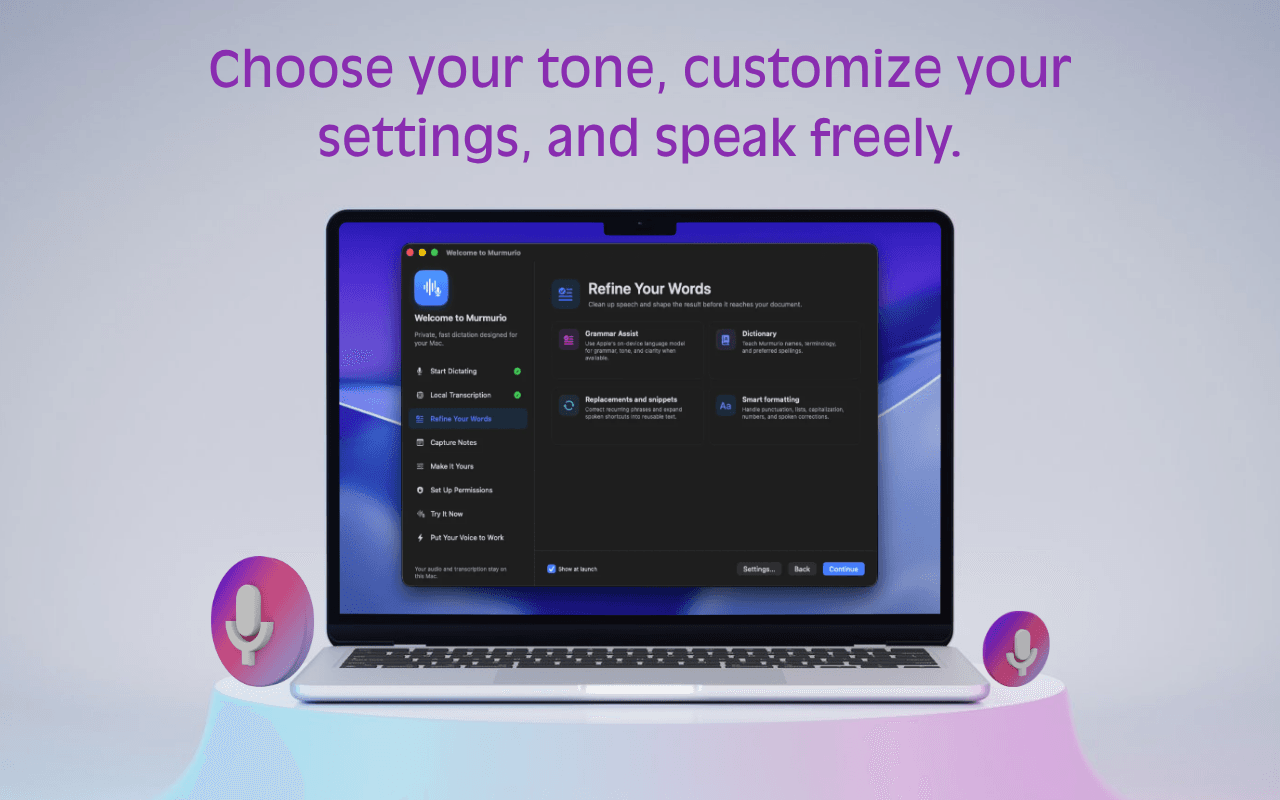
Kombiniere die Grammatikhilfe mit deinem Wörterbuch, Textersetzungen, Textbausteinen und Formatierungseinstellungen. Für durchdachte Ergebnisse mit weniger wiederholten Korrekturen.
So klingt es nach dirDein Mac hört zu. Dein Mac denkt mit. Die integrierte Spracherkennung und die optionale lokale Schreibhilfe erledigen die Arbeit direkt bei dir.
Lokale Verarbeitung. Von Grund auf.FluidAudio CoreML-Modelle wandeln Sprache auf deinem Mac in Text um. Beim ersten Start ist kein Download von Sprachmodellen nötig.
Die Grundlage jedes DiktatsNutze Apple Foundation Models für Grammatik und Klarheit, wenn sie auf deinem Mac verfügbar sind. Die Verfügbarkeit hängt von deinem System und deinen Einstellungen ab.
Erfordert eine unterstützte KI-Konfiguration von AppleDu verwaltest dein Modell lieber selbst? Verbinde die Grammatikhilfe mit einem lokalen Ollama-Modell. Ollama und das Modell müssen separat eingerichtet werden.
Ein alternatives Modell für die GrammatikhilfeMit Murmurios integrierten Sprachmodellen kannst du weiterhin diktieren. Die Grammatikhilfe ist optional; ihre Verfügbarkeit hängt von deinem Mac und dem konfigurierten Modell ab. Die Mindestanforderung macOS 14+ für die App bedeutet nicht, dass Apples Schreibmodelle auf jedem unterstützten Mac verfügbar sind.
Nicht jeder Gedanke gehört in ein Textfeld. Gib den Gedanken, die du behalten möchtest, einen eigenen Platz – direkt auf deinem Mac.
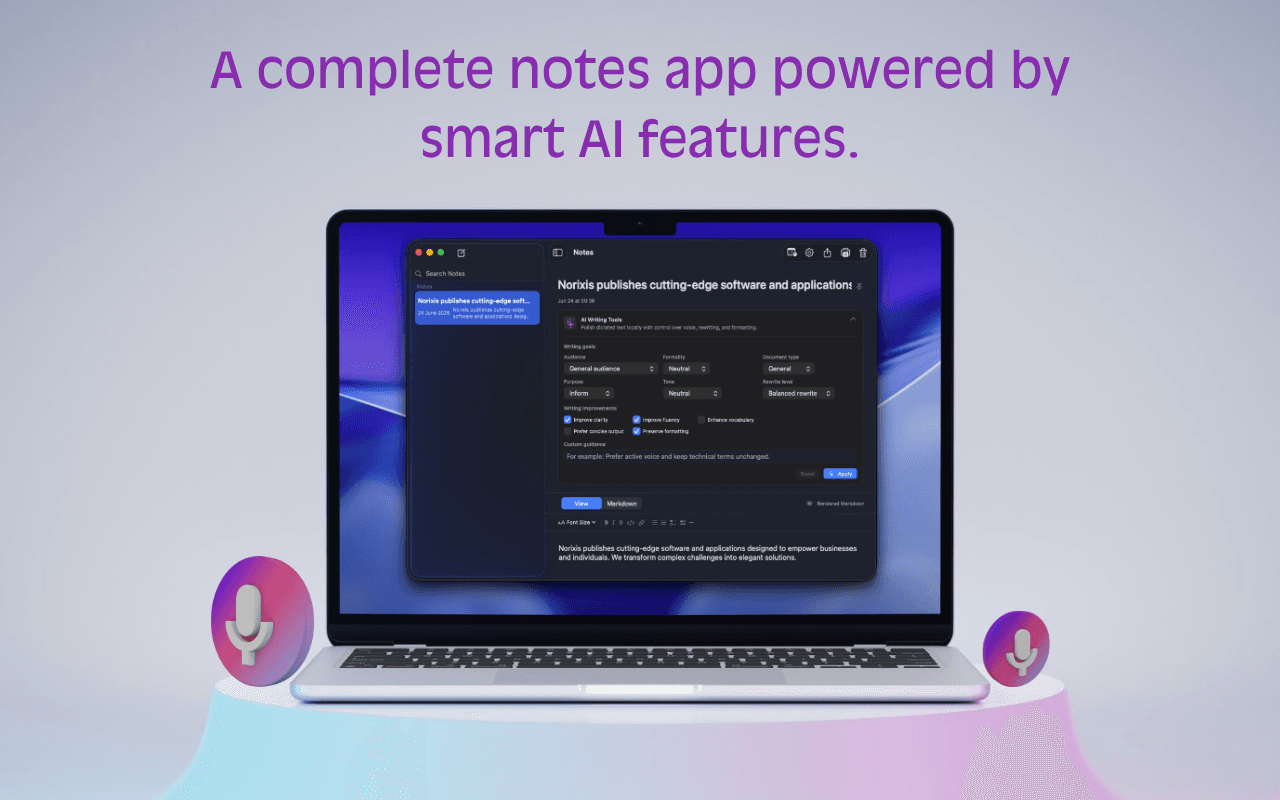
Diktiere mit dem eigenen Tastenkürzel für Notizen direkt in eine Notiz. Du brauchst kein leeres Dokument zu suchen.
Durchsuche die Seitenleiste, hefte wichtige Notizen an und bearbeite Titel oder Inhalt, sobald die Idee Gestalt annimmt.
Nutze die KI-Werkzeuge für Notizen, um Grammatik, Klarheit, Ton und Förmlichkeit anzupassen, wenn Apples KI auf dem Gerät verfügbar ist.
Die Namen deines Teams. Deine alltäglichen Ausdrücke. Dein Schreibstil. Lege die Details einmal fest und lass sie Teil deines Arbeitsablaufs werden.
Ergänze dein Wörterbuch um Namen, Fachbegriffe und bevorzugte Schreibweisen.
Erweitere gesprochene Kurzbefehle mit eigenen Textbausteinen zu wiederverwendbarem Text.
Nutze Ersetzungen und Bereinigungseinstellungen für Korrekturen, die du immer wieder vornimmst.
Ein ruhiger Platz in deiner Menüleiste.
Überraschend viel dahinter.
Starte in der App, die du gerade nutzt. Verwende einen globalen Kurzbefehl, halte zum Sprechen eine Taste gedrückt oder nutze den Freisprechmodus. Füge dann dein Transkript ein und mach weiter.
Dein Kurzbefehl. Dein Rhythmus.Die Screenshots zeigen die englische Benutzeroberfläche.Vom ersten groben Satz bis zur Notiz, auf die du zurückkommst: Die kleinen nützlichen Helfer sind schon da.
Starte die Spracheingabe in jeder App und wähle die Auslösung, die zu deiner Arbeitsweise passt.
Verwandle gesprochene Entwürfe in Text, der vor dem Senden oder Speichern weniger Korrekturen braucht.
Diktiere direkt in Murmurio, wenn ein Gedanke in eine Notiz statt in eine andere App gehört.
Erfahre genau, was Murmurio von macOS benötigt und warum.
Passe die Details an, damit sich Diktieren auch im Alltag natürlich anfühlt.
Murmurio transkribiert mit integrierten lokalen Sprachmodellen. Die Grammatikassistenz kann verfügbare Apple Foundation Models oder ein lokales Ollama-Modell verwenden.
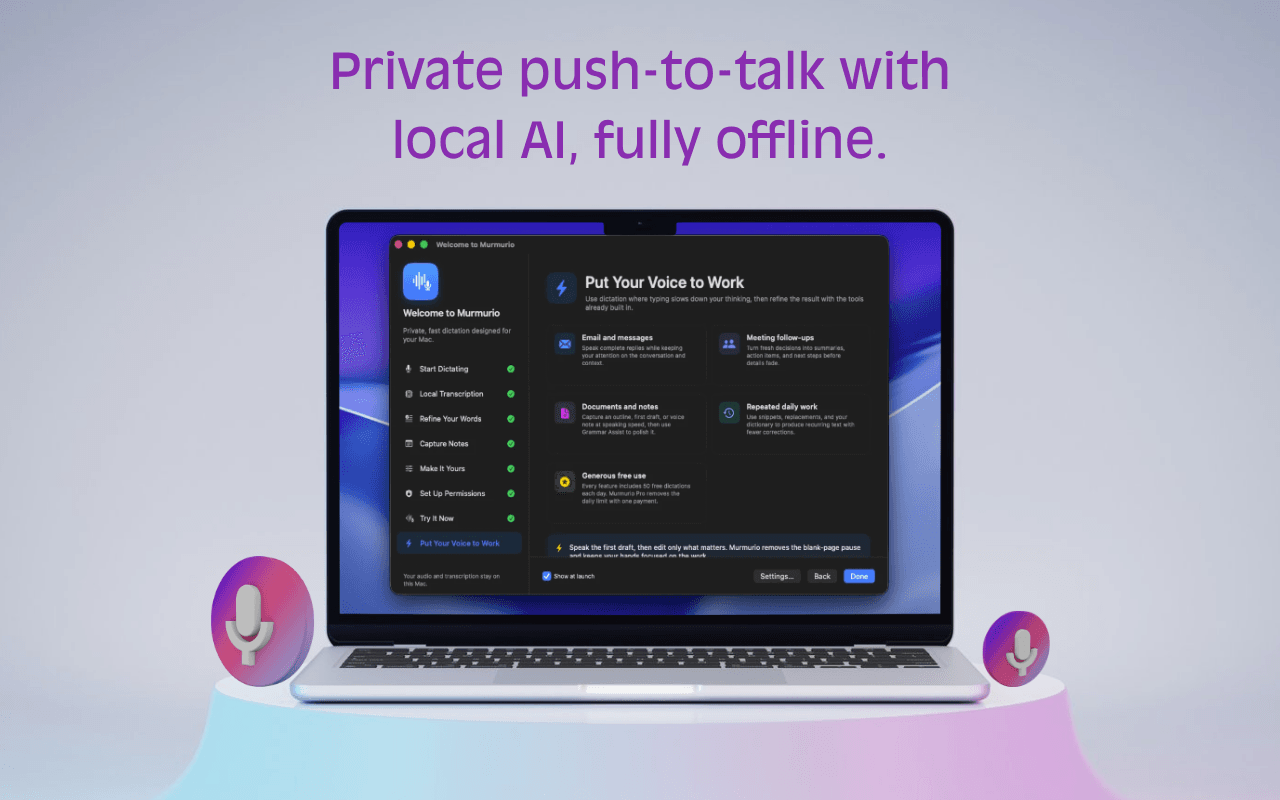 App-Screenshot auf Englisch.
Murmurio wurde exklusiv für macOS und Apple Silicon entwickelt – für optimale Leistung, Tastaturintegration und native Systemberechtigungen.
So entwickelt, wie sich ein Mac anfühlen sollte.Kostenlos sind 50 Diktate pro Tag und bis zu 10 Notizen enthalten. Eine einmalige Zahlung von 19 € schaltet Murmurios erweiterte Pro-Funktionen – einschließlich unbegrenzter Diktate und Notizen – auf bis zu drei Macs lebenslang frei.
€0Kostenlos nutzbar
€19Einmal zahlen. Kein Abo.
19 € auf Lebenszeit · Bis zu drei Macs
Keine versteckten Kosten, Abos oder Verlängerungen. Die sichere Zahlungsabwicklung erfolgt über Link und Stripe als rechtlich verantwortlichen Verkäufer (Merchant of Record).
Wenn macOS eine Bestätigung verlangt, weil Murmurio aus dem Web geladen wurde, öffne die App im Finder und folge dem Systemhinweis. Berechtigungen bleiben in den Systemeinstellungen unter deiner Kontrolle.
Nein. Die Spracherkennung läuft auf dem Gerät mit mitgelieferten CoreML-Modellen. Die optionale Grammatikassistenz kann verfügbare lokale Apple-Modelle oder ein lokales Ollama-Modell nutzen.
Murmurio benötigt macOS 14 Sonoma oder neuer auf Apple Silicon.
Nein. Murmurio gibt es ausschließlich für macOS. Als native Mac-App lassen sich Leistung, Tastenkürzel, Menüleistenverhalten, Berechtigungen und Schreibgefühl auf Mac-Nutzer abstimmen.
Damit erkennt Murmurio dein konfiguriertes globales Tastenkürzel über Apps hinweg. Sie wird nicht zum Erfassen getippter Inhalte verwendet.
Bedienungshilfen dienen nur dem automatischen Einfügen. Ohne sie kopiert Murmurio das Transkript weiterhin zum manuellen Einfügen in die Zwischenablage.
Entpacke Murmurio, verschiebe es nach „Programme“, öffne es und erteile die gewünschten Berechtigungen in den Systemeinstellungen.
Nein. Murmurio Pro kostet einmalig 19 € für lebenslangen Zugriff auf erweiterte Funktionen. Es gibt keine Abos, Verlängerungen oder versteckten Kosten.
Diktiere dort, wo du bereits schreibst.
Murmurio für macOS laden